Comment configurer NoLagVPN sur votre routeur
À propos de la configuration de NoLagVPN sur votre routeur
- Using a NoLagVPN with the best server locations is the simplest and most reliable way to access bot lobbies in Warzone.
- Reverse boosting, tanking stats, playing early morning or during weekdays, dropping without full squad and playing with randoms are other ways of getting into easy lobbies in Warzone.
- Playing with noob friends can also reduce the skill level of your opponents for beating your kill records!
- Combining solutions such as using a VPN or other methods mentioned above can help gain access to ultimate bot lobby experiences!
Suivez ces étapes pour facilement configurer NoLagVPN sur votre PC.
Installez NoLagVPN sur votre PC
1. Téléchargez le VPN: OpenVPN Connect V3 (ou OpenVPN Connect V2)
2. Allez à votre tableau de bord NoLagVPN: Tableau de bord NoLagVPN
3. Téléchargez les configurations VPN

Capture d'écran du tableau de bord
4. Lancez OpenVPN Connect
5. Cliquez sur "Fichier", puis chargez votre configuration VPN
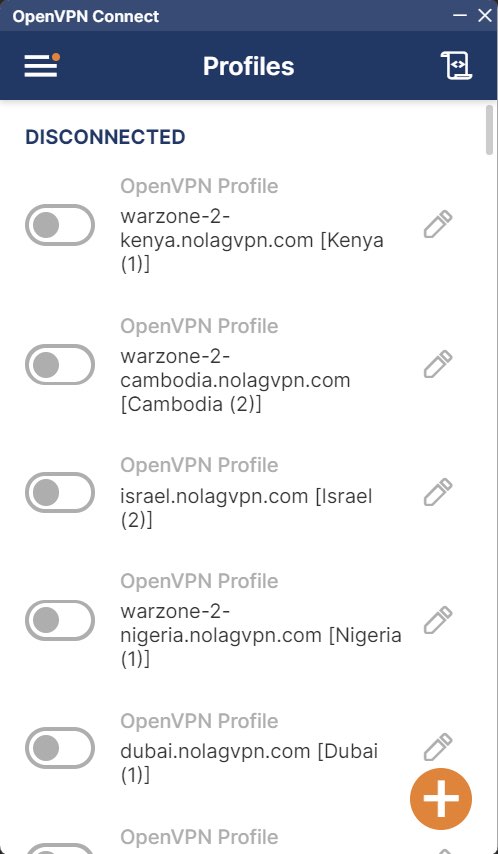
Capture d'écran de OpenVPN Connect
6. Connectez-vous à l'emplacement souhaité
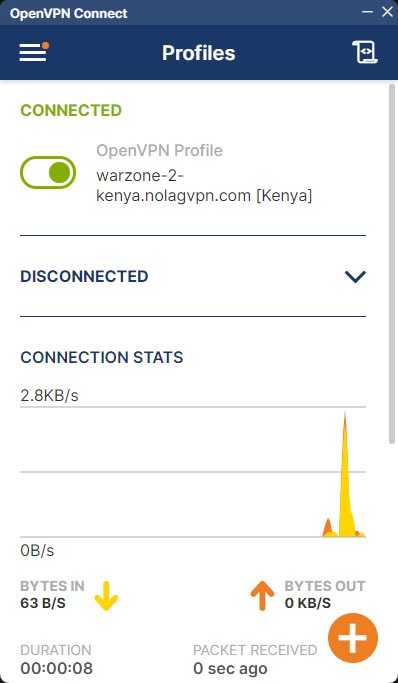
Capture d'écran de OpenVPN Connect
7. Démarrez BattleNet, Steam ou GamePass, puis démarrez Warzone
Voilà, votre PC est maintenant connecté via NoLagVPN!
Prêt à jouer contre des bots sur votre PC?