Como configurar NoLagVPN no seu roteador
Sobre configurar NoLagVPN no seu roteador
- Using a NoLagVPN with the best server locations is the simplest and most reliable way to access bot lobbies in Warzone.
- Reverse boosting, tanking stats, playing early morning or during weekdays, dropping without full squad and playing with randoms are other ways of getting into easy lobbies in Warzone.
- Playing with noob friends can also reduce the skill level of your opponents for beating your kill records!
- Combining solutions such as using a VPN or other methods mentioned above can help gain access to ultimate bot lobby experiences!
Siga estas etapas para configurar facilmente o NoLagVPN no seu PC.
Instale o NoLagVPN no seu PC
1. Baixe o VPN: OpenVPN Connect V3 (ou OpenVPN Connect V2)
2. Vá para o painel do seu NoLagVPN: Painel NoLagVPN
3. Baixe as configurações do VPN

Captura de tela do painel
4. Inicie o OpenVPN Connect
5. Clique em "Arquivo", então carregue a configuração do seu VPN
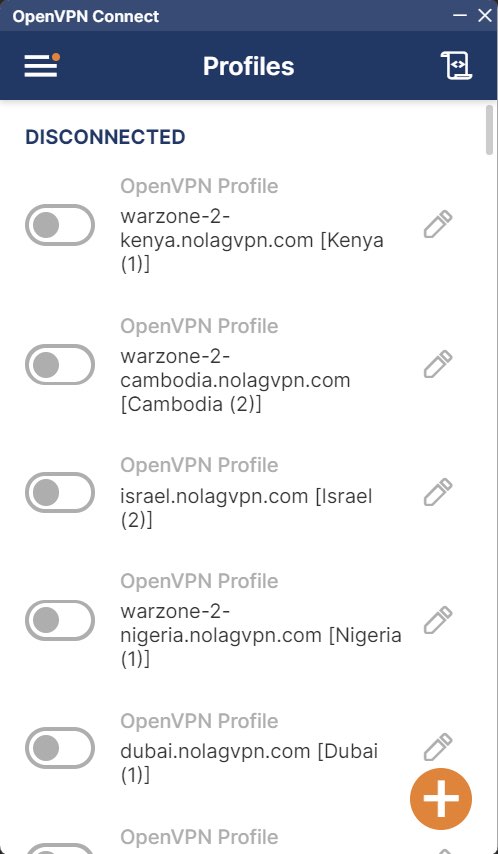
Captura de tela do OpenVPN Connect
6. Conectar ao local desejado
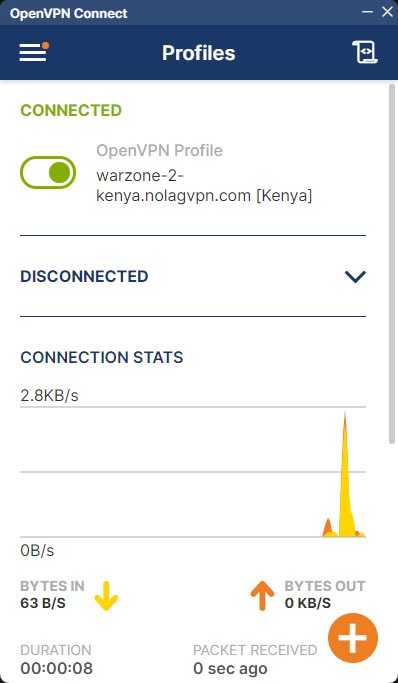
Captura de tela do OpenVPN Connect
7. Inicie BattleNet, Steam ou GamePass, depois inicie Warzone
Pronto, seu PC agora está conectado através do NoLagVPN!
Pronto para jogar contra bots no seu PC?