Come impostare NoLagVPN sul tuo router
Informazioni sull'impostazione di NoLagVPN sul tuo router
- Using a NoLagVPN with the best server locations is the simplest and most reliable way to access bot lobbies in Warzone.
- Reverse boosting, tanking stats, playing early morning or during weekdays, dropping without full squad and playing with randoms are other ways of getting into easy lobbies in Warzone.
- Playing with noob friends can also reduce the skill level of your opponents for beating your kill records!
- Combining solutions such as using a VPN or other methods mentioned above can help gain access to ultimate bot lobby experiences!
Segui questi passaggi per configurare facilmente NoLagVPN sul tuo PC.
Installa NoLagVPN sul tuo PC
1. Scarica la VPN: OpenVPN Connect V3 (o OpenVPN Connect V2)
2. Vai sulla tua dashboard NoLagVPN: Dashboard NoLagVPN
3. Scarica le configurazioni VPN

Screenshot dalla dashboard
4. Avvia OpenVPN Connect
5. Fai clic su "File", poi carica la tua configurazione VPN
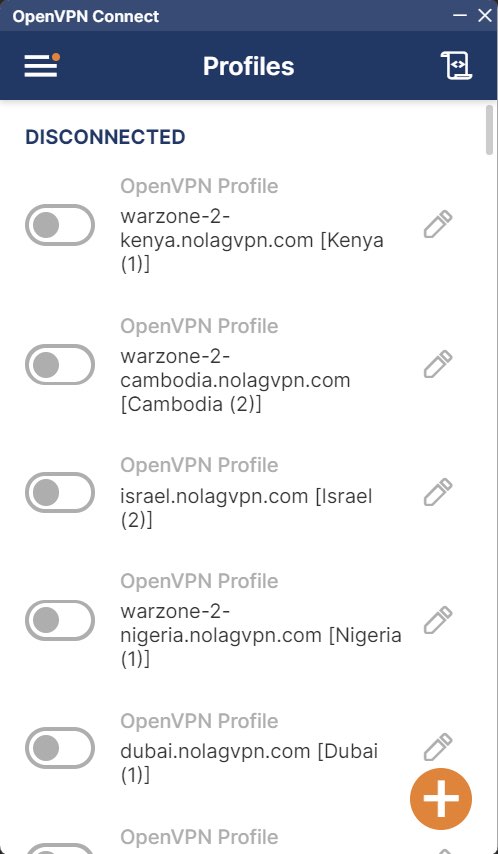
Screenshot di OpenVPN Connect
6. Connettiti alla posizione desiderata
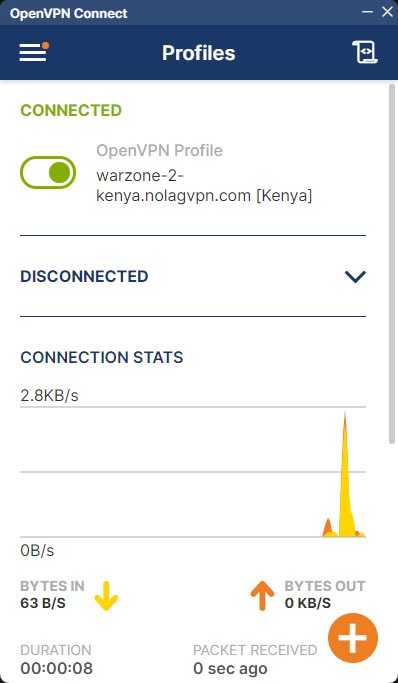
Screenshot di OpenVPN Connect
7. Avvia BattleNet, Steam o GamePass, quindi avvia Warzone
Ecco fatto, il tuo PC è ora connesso tramite NoLagVPN!
Pronto a giocare contro i bot sul tuo PC?