Wie Sie NoLagVPN auf Ihrem Router einrichten
Über die Einrichtung von NoLagVPN auf Ihrem Router
- Using a NoLagVPN with the best server locations is the simplest and most reliable way to access bot lobbies in Warzone.
- Reverse boosting, tanking stats, playing early morning or during weekdays, dropping without full squad and playing with randoms are other ways of getting into easy lobbies in Warzone.
- Playing with noob friends can also reduce the skill level of your opponents for beating your kill records!
- Combining solutions such as using a VPN or other methods mentioned above can help gain access to ultimate bot lobby experiences!
Befolgen Sie diese Schritte, um NoLagVPN einfach auf Ihrem PC einzurichten.
Installieren Sie NoLagVPN auf Ihrem PC
1. Laden Sie das VPN herunter: OpenVPN Connect V3 (oder OpenVPN Connect V2)
2. Gehen Sie zu Ihrem NoLagVPN-Dashboard: NoLagVPN Dashboard
3. Laden Sie die VPN-Konfigurationen herunter

Screenshot vom Dashboard
4. Starten Sie OpenVPN Connect
5. Klicken Sie auf "Datei", dann laden Sie Ihre VPN-Konfiguration
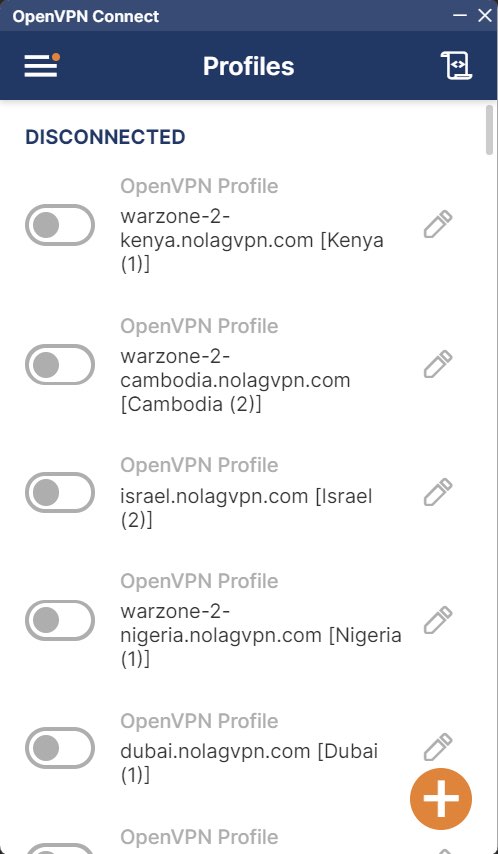
Screenshot von OpenVPN Connect
6. Mit dem gewünschten Ort verbinden
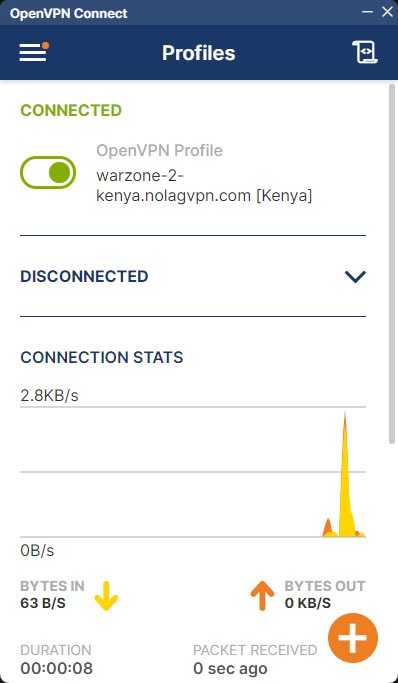
Screenshot von OpenVPN Connect
7. Starte BattleNet, Steam oder GamePass, dann starte Warzone
Das war's, Ihr PC ist jetzt über NoLagVPN verbunden!
Bereit zum Spielen gegen Bots auf Ihrem PC?